
#
Sending messages
In this page we'll guide you on creating custom messages from other scripts.
You can still create messages through the "chat:addMessage" event or our export even though these
approaches are discouraged.
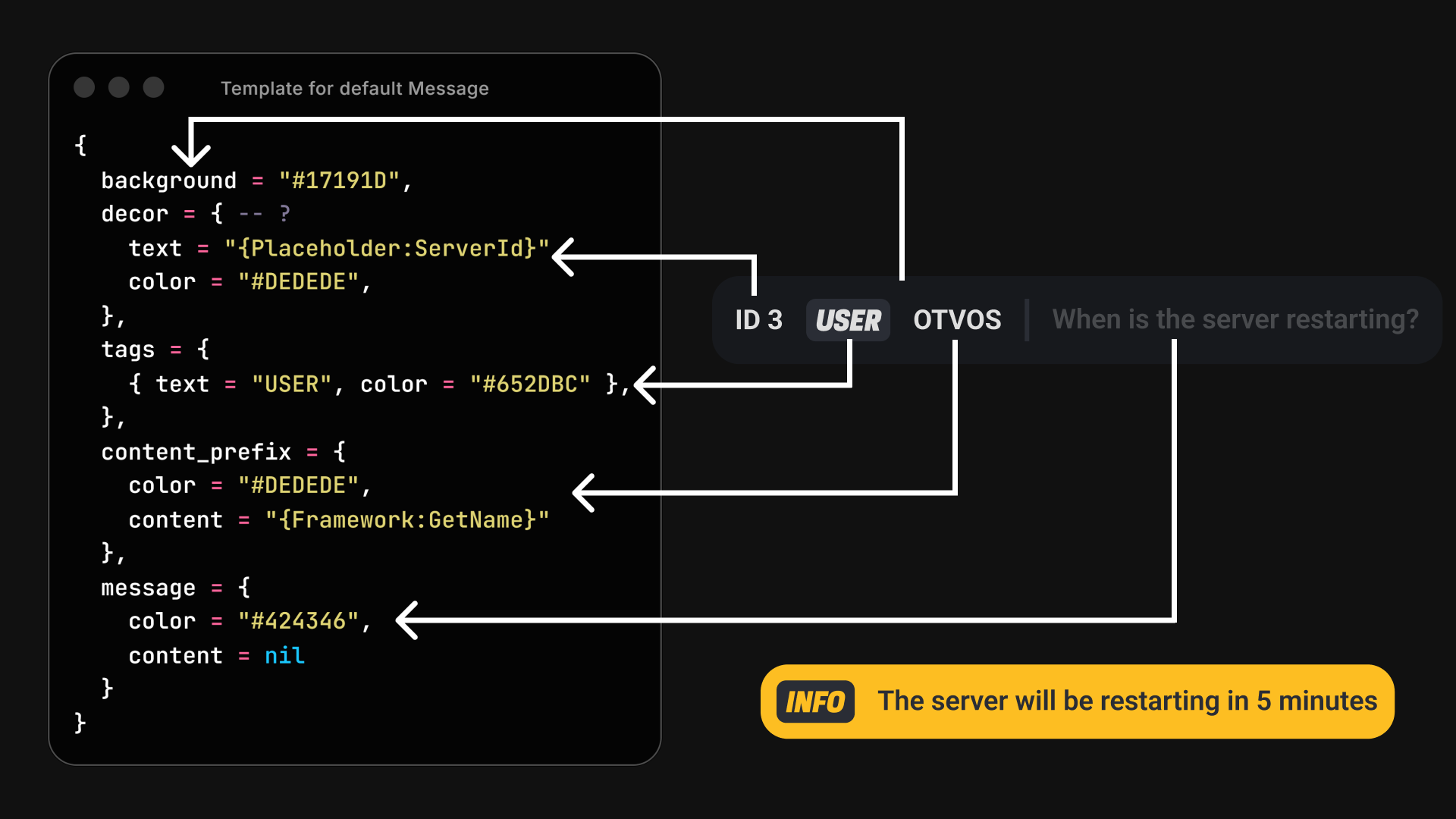
What fields are used to render a message?
setBackground(color: hexcolor)
Background
setDecoration(content: string, color?: hexcolor)
Decor
addTag(content: string, color?: hexcolor)
Tags[#Tags++]
setPrefix(content: string, color?: hexcolor)
Prefix
setMessage(content: string, color?: hexcolor)
Message
#
1. Creating & Sending a message
It's incredibly easy to customize a message. You'll be needing to export our Message Factory provided by our chatApi. After doing so, you'll have access to a set of methods that'll effortesly help you create messages from the ground up. Only the message content is required and if no color is provided, we'll default to your template defaults.
-- getApiContext is available Client & Server side
local chatApi = exports["of_chat"]:getApiContext()

  chatApi.createMessage("Some fancy runtime created message")
    :setDecoration("ID 2") -- No color provided? We default to the template color
    -- :setTargets({ 1, 2 }) When using the export server-side (Who's gonna receive the message)
    :addTag("POLICE", "#0000ff")
    :setPrefix("Amyset", "#000000")
    :setBackground("#ffffff")
    :send()

  -- Fields are optional but the message content
  chatApi.createMessage("Another fancy runtime created message")
    :setPrefix("Amyset", "#000000")
    :setBackground("#ffffff")
    :send()

  -- Text content can be multi-fragment
  chatApi.createMessage({"My", "multi", "fragmented", nil, "message"})
    :setPrefix({"Name", "Firstname"}, "#000000")
    :setBackground("#ffffff")
    :send()