
Context menu
A mouse-driven menu that can nest into submenus. Non-blocking: you register menus once, then show them; selections come back through callbacks.
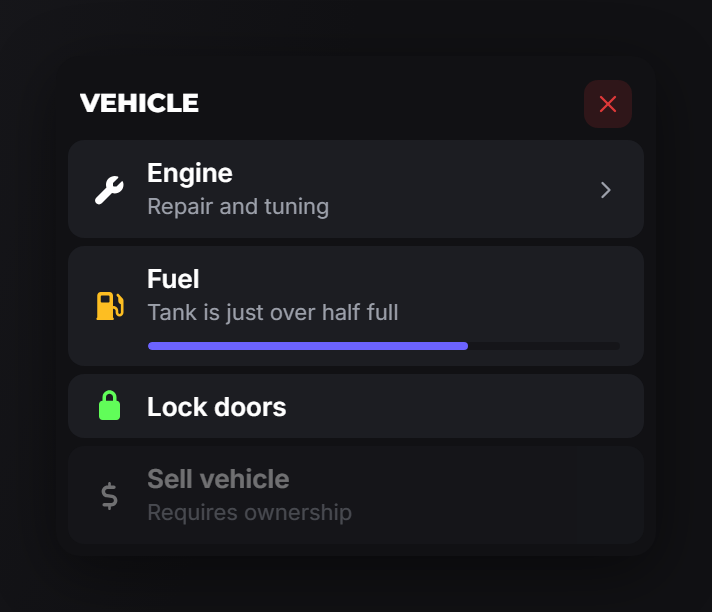
registerMenu
exports.of_ui:registerMenu(menu)   -- one menu
exports.of_ui:registerMenu({ menuA, menuB }) -- several at once| Field | Type | Description |
|---|---|---|
id | string | Unique id. Required. |
title | string | Header text. |
options | table | The items: an array, or a table where each key is the item's title. |
menu | string? | Parent menu id, used as the back target when this menu is opened directly. |
canClose | boolean? | false removes the X and ESC. |
onExit | function? | Called when the player closes the menu. |
onBack | function? | Called when the player navigates back out of this menu. |
showMenu
exports.of_ui:showMenu(id)Opens a registered menu. Raises an error if no menu has that id.
The whole reachable tree is sent at once, so navigating into a submenu is instant and needs no round trip to Lua.
hideMenu
exports.of_ui:hideMenu(onExit)Closes the open menu. Pass true to also fire that menu's onExit.
getOpenMenu
local id = exports.of_ui:getOpenMenu()Returns the id of the open menu, or nil.
Items
| Field | Type | Description |
|---|---|---|
title | string? | Item label. Optional only in the dict form, where the key supplies it. |
description | string? | Muted second line. |
icon | string|table? | Icon on the left. |
iconColor | string? | Hex colour for the icon. |
iconAnimation | string? | Font Awesome animation. |
image | string? | Picture shown when the item is hovered. |
progress | number? | 0–100 bar under the description. |
colorScheme | string? | Accent for the progress bar. |
arrow | boolean? | Draws a chevron on the right. |
disabled | boolean? | Greyed out and unclickable. |
readOnly | boolean? | Displayed but not selectable: for pure information rows. |
metadata | string|string[]|table? | Detail card shown on hover. See below. |
menu | string|table? | Submenu id, or an inline submenu table. |
onSelect | function? | Runs on click, with args. |
event | string? | Client event triggered on click, with args. |
serverEvent | string? | Server event triggered on click, with args. |
args | any? | Passed to whichever of the three fires. |
menu wins over actions. An item with both navigates and never runs the action. With Config.debug on, of_ui prints a warning when it sees that combination.
Metadata
Hover detail, in three forms:
metadata = 'Last refuel: Xero Gas'                 -- one line
metadata = { 'Line one', 'Line two' }               -- several lines
metadata = { Price = '$4,500' }                     -- label → value
metadata = {                                        -- full form
    { label = 'Tank', value = '68L', progress = 68 },
    { label = 'Fuel quality', progress = 91, colorScheme = '#61fd59' },
    { label = 'Consumption', value = '11.2L/100km' },
}
Example
exports.of_ui:registerMenu({
    {
        id = 'vehicle',
        title = 'Vehicle',
        options = {
            { title = 'Engine', description = 'Repair and tuning',
              icon = 'wrench', menu = 'vehicle_engine', arrow = true },
            {
                title = 'Fuel',
                description = 'Tank is just over half full',
                icon = 'gas-pump', iconColor = '#fdbe22',
                progress = 68, readOnly = true,
                metadata = {
                    { label = 'Tank', value = '68L', progress = 68 },
                    { label = 'Consumption', value = '11.2L/100km' },
                },
            },
            { title = 'Lock doors', icon = 'lock', iconColor = '#61fd59',
              onSelect = function() TriggerEvent('vehicle:lock') end },
            { title = 'Sell vehicle', icon = 'dollar-sign',
              description = 'Requires ownership', disabled = true },
        },
    },
    {
        id = 'vehicle_engine',
        title = 'Engine',
        menu = 'vehicle',  -- back button target
        options = {
            { title = 'Repair', icon = 'screwdriver-wrench',
              onSelect = function() TriggerServerEvent('vehicle:repair') end },
            { title = 'Upgrade turbo', icon = 'gauge-high',
              metadata = { Price = '$4,500' },
              onSelect = function() TriggerServerEvent('vehicle:turbo') end },
        },
    },
})

exports.of_ui:showMenu('vehicle')
Inline submenus
Small trees do not need global ids: nest the submenu table directly and of_ui registers it for you, with the parent as its back target:
{ title = 'Engine', icon = 'wrench', arrow = true, menu = {
    title = 'Engine',
    options = {
        { title = 'Repair', onSelect = function() ... end },
    },
} }
Dict form
Using titles as keys is shorter when you have no submenus. Note that Lua tables have no order, so the items will not necessarily appear as written:
options = {
    ['Lock doors'] = { icon = 'lock', onSelect = function() ... end },
    ['Open trunk'] = { icon = 'box-open', onSelect = function() ... end },
}
Use the array form when order matters.
Notes
- Menus are cleaned up automatically. When the resource that registered a menu stops, its menus are dropped and an open one is closed.
- Callbacks never leave Lua.
onSelect,onExitandonBackstay in your script; the UI only receives labels and flags. - Long menus get a search box so the player can filter instead of scrolling.
- The player can keep moving while the menu is open: ↑/↓, Enter, Backspace and ESC are read on the Lua side and forwarded to the UI instead of being taken from the game. The camera stays locked while the menu is up — the mouse is pointing at rows, not looking around. The exception is the search box — typing needs the whole keyboard, so the player stands still for as long as it is focused and starts moving again the moment it loses focus.