
Radial menu
A mouse-driven wheel. Items registered by different resources share one global wheel; each can also own submenus.
It comes in two styles. Both take the same items and the same exports, so everything on this page applies to either one.
Styles
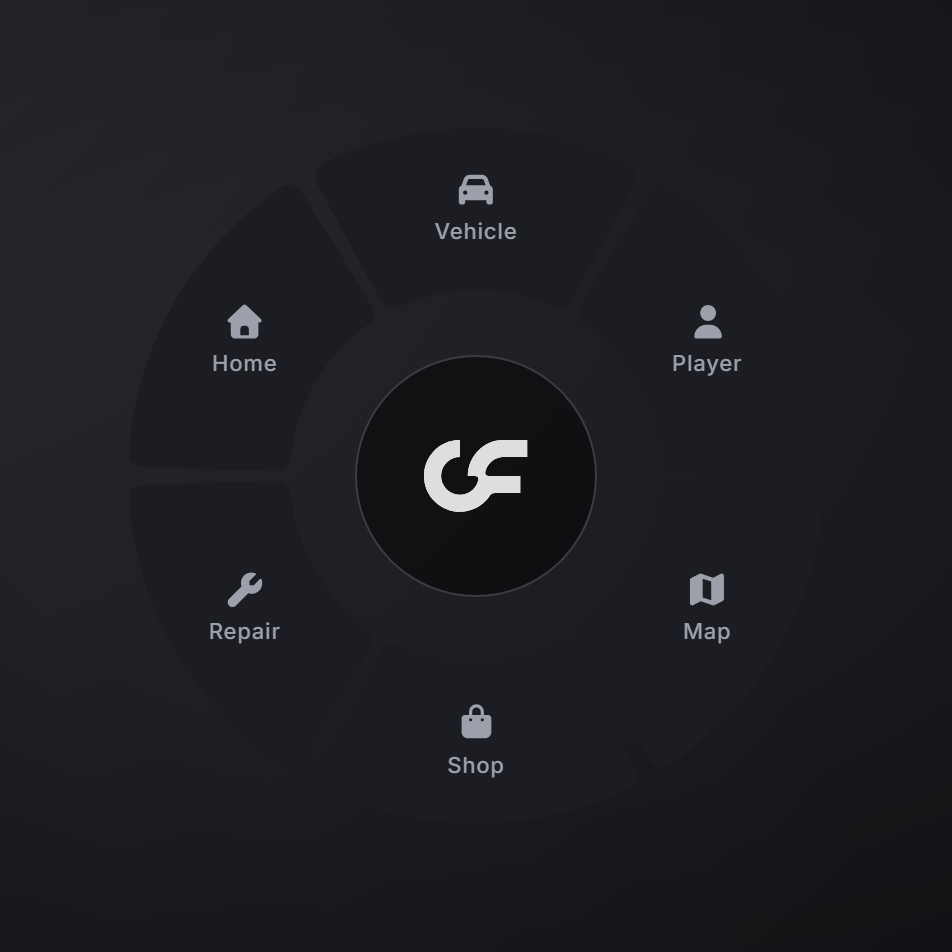
The default. Slices around a centre ring, with a cursor that orbits towards whichever slice the mouse points at. Labels sit next to their icons, and the centre is the back button.
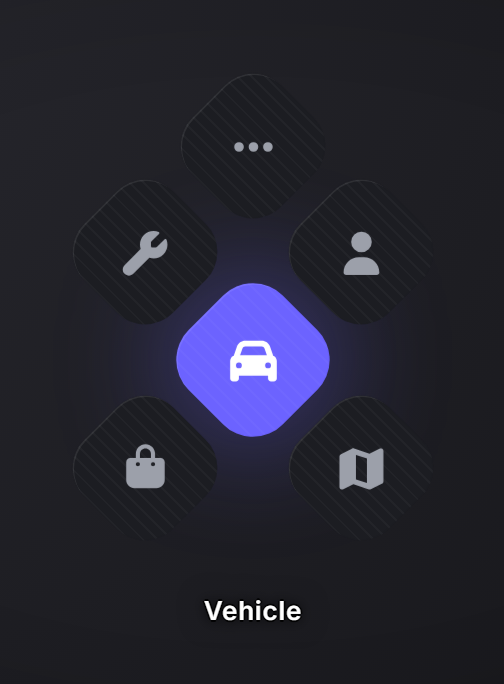
Tiles carry only their icon. The label of the one under your mouse appears below the lattice, and that tile fills with your accent colour and lights a halo around itself.
Close Honeycomb
The honeycomb has no centre hub, so there is nothing to click to go back. Right-click steps back through submenus and pages, and closes the menu at the root or clicking outside a button.
Choosing a style
Three things decide the look, and the first one that answers wins:
- The submenu, if it declared a
stylein registerRadial. - The opening, if you passed a style to the command. It holds until the menu closes, submenus included.
- The theme, which is the player's choice and the default for everything else.
Leave it out and the player's theme decides, which keeps the look consistent across every resource on the server. Pass one only when it carries meaning for your menu.
To try a style yourself, open the settings menu and pick Radial > Style:
/themesettingsTo ship it as your server's default, switch it there, copy the theme code from the export field, and paste it into config/config.lua:
Config.Theme = {
    Default = 'OF17-...',  -- a code you exported with the honeycomb selected
}
To make it your style rather than a player preference, lock the token as well:
Config.Theme = {
    Default = 'OF17-...',
    LockedTokens = { 'radial.style' },
}
See Theming for how codes and locked tokens work.
What you can restyle
Under Radial in the settings menu: Tile hover (the accent wash and its halo, which follows global.accent until you set it), plus tile size, gap, corner radius, glow, hover scale, icon size, and the caption's size and gap. Segment and Segment hover belong to the wheel.
Opening the wheel
of_ui registers no keybind: the radial is a library component, so the resource using it decides how it opens. The entry point is a command:
ExecuteCommand('of_ui_radial')It takes an optional style, which holds until the menu closes:
ExecuteCommand('of_ui_radial honeycomb')Give it a key in your own resource:
RegisterCommand('myresource:radial', function()
    ExecuteCommand('of_ui_radial')
end, false)

RegisterKeyMapping('myresource:radial', 'Open the radial menu', 'keyboard', 'z')
Running it while the wheel is open closes it.
addRadialItem
exports.of_ui:addRadialItem(item)   -- one
exports.of_ui:addRadialItem({ a, b })  -- several
Adds items to the global wheel. An item whose id already exists is replaced, so calling this again is how you update one.
| Field | Type | Description |
|---|---|---|
id | string | Required for global items: it is the upsert key. |
label | string | Text under the icon. |
icon | string|table | The icon. |
menu | string? | Submenu to open instead of selecting. |
onSelect | function|string? | (currentMenu, itemIndex). A string is treated as an export name on the resource that registered the item. |
keepOpen | boolean? | Leaves the wheel open after selecting. |
iconWidth / iconHeight | number? | Icon size override. |
exports.of_ui:addRadialItem({
    id = 'repair',
    icon = 'wrench',
    label = 'Repair',
    onSelect = function() TriggerServerEvent('vehicle:repair') end,
})
removeRadialItem
exports.of_ui:removeRadialItem(id)Removes a global item. If the wheel is open it refreshes.
clearRadialItems
exports.of_ui:clearRadialItems()Removes every global item.
warning
This clears items registered by every resource, not just yours. Prefer removeRadialItem for your own entries.
registerRadial
exports.of_ui:registerRadial(radial)Registers a submenu, which items reach via menu.
| Field | Type | Description |
|---|---|---|
id | string | Submenu id. |
items | table[] | Same item shape as above. id is optional here. |
style | 'wheel'|'honeycomb'? | Pins this submenu's look. Omit it to follow the player's theme. |
exports.of_ui:registerRadial({
    id = 'vehicle_options',
    style = 'honeycomb',   -- this submenu, whatever the player's theme says
    items = { ... },
})
An unknown value raises an error at registration rather than falling back silently.
exports.of_ui:registerRadial({
    id = 'vehicle_options',
    items = {
        { icon = 'wrench', label = 'Repair', onSelect = function() ... end },
        { icon = 'door-open', label = 'Doors', menu = 'vehicle_doors' },
    },
})

exports.of_ui:addRadialItem({
    id = 'vehicle',
    icon = 'car',
    label = 'Vehicle',
    menu = 'vehicle_options',  -- opens the submenu instead of selecting
})
Submenus keep a history, so the back button walks the player out the way they came in.
hideRadial
exports.of_ui:hideRadial()Closes the wheel.
getCurrentRadialId
local id = exports.of_ui:getCurrentRadialId()Id of the open submenu, or nil when the global wheel is showing.
disableRadial
exports.of_ui:disableRadial(state)true blocks the wheel from opening and closes it if it is open: for cuffed players, cutscenes, dead states. false re-enables it.
Notes
- Items are cleaned up automatically. When a resource stops, its items and submenus are removed.
- Open menus refresh live. Adding or removing an item while the wheel is open updates it; if the change removes the path to the open submenu, the wheel walks back to the parent.
- The wheel is mouse-only. The player can still move while it is open: camera control and firing are suppressed so the mouse only drives the wheel.
- The wheel will not open while another NUI has focus or the pause menu is up, or while there are no global items.
- Clicking outside closes the menu, from wherever the player is, submenus included. Only the slices and tiles themselves are solid: the gaps between them count as outside.
- More items than fit on a page roll into a more slot that pages through the rest.
- The look can be pinned per opening (
of_ui_radial <style>) or per submenu (styleonregisterRadial). Both are optional; without them the player's theme decides.