
Drawer
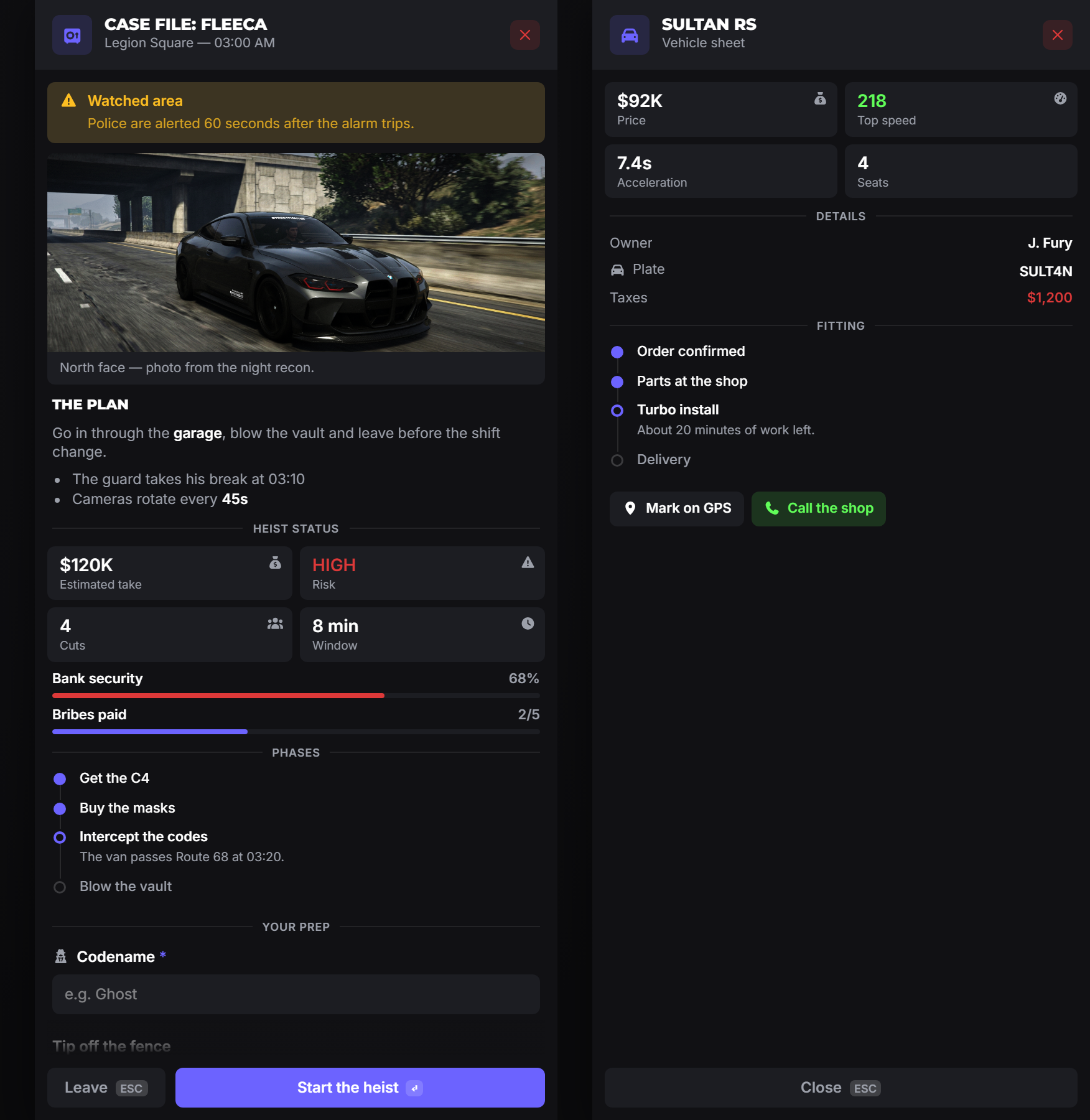
A side panel built from rows. It is the most flexible component in the library: a read-only dossier, a form, a live HUD readout, or all three in one panel.
drawer
local values, byId = exports.of_ui:drawer(data)Blocking by default: it waits for Confirm and returns the same pair as input: a positional values array and a byId table, or nil when the panel was closed without confirming. Call it from a thread.
With focus = false it returns immediately instead. See Passive panels.
| Field | Type | Description |
|---|---|---|
title | string | Header title. |
subtitle | string? | Muted line under the title. |
icon | string|table? | Header icon. |
iconColor | string? | Hex colour for the icon. |
rows | table[] | The content. Same rows as the input dialog: see Rows. A bare string becomes a markdown row. |
side | string? | left or right. Theme decides when omitted. |
width | number? | Panel width in pixels. Theme decides when omitted. |
confirm | boolean? | false hides the Confirm button, leaving an info panel with only Close. |
canClose | boolean? | false removes the X, ESC and the overlay click. |
labels | table? | { confirm?: string, close?: string }: override the footer buttons. |
focus | boolean? | false makes it a passive HUD panel. See below. |
onAction | function? | Called with the id of a clicked buttons item. |
CreateThread(function()
    local values, byId = exports.of_ui:drawer({
        title = 'Case file: Fleeca',
        subtitle = 'Legion Square, 03:00 AM',
        icon = 'vault',
        side = 'right',
        width = 420,
        labels = { confirm = 'Start the heist', close = 'Leave' },
        rows = {
            { type = 'callout', variant = 'warning', label = 'Watched area',
              description = 'Police are alerted 60 seconds after the alarm trips.' },
            { type = 'divider', label = 'Your prep' },
            { type = 'input', label = 'Codename', id = 'alias', required = true },
        },
    })

    if not values then return end -- closed without confirming
    print(byId.alias)
end)
closeDrawer
exports.of_ui:closeDrawer()Closes the panel from code. A blocking drawer call returns nil; a passive one just disappears.
updateDrawer
exports.of_ui:updateDrawer(patch)Patches the open panel in place. Anything the player has typed or selected survives the update.
| Field | Type | Description |
|---|---|---|
title | string? | New header title. |
subtitle | string? | New subtitle. |
rows | table? | Partial rows keyed by row id, merged over the matching row. |
Only rows that declared an id can be patched, and rows cannot be added or removed, only changed.
Info panels
Drop confirm and you have a document rather than a form: the vehicle sheet on the right of the screenshot above:
exports.of_ui:drawer({
    title = 'Sultan RS',
    subtitle = 'Vehicle sheet',
    icon = 'car',
    confirm = false,
    rows = {
        { type = 'stats', items = {
            { label = 'Price', value = '$92K', icon = 'sack-dollar' },
            { label = 'Top speed', value = '218', icon = 'gauge-high', colorScheme = '#61fd59' },
        } },
        { type = 'divider', label = 'Details' },
        { type = 'keyvalue', items = {
            { label = 'Owner', value = 'J. Fury' },
            { label = 'Plate', value = 'SULT4N', icon = 'car' },
        } },
    },
})
Note this still blocks until the player closes it. That is usually what you want for a document. It lets you run cleanup on the line after.
Passive panels
focus = false turns the drawer into a HUD readout: no overlay, no footer, no X, no keyboard, and it never takes NUI focus, so the player keeps playing. The export returns immediately.
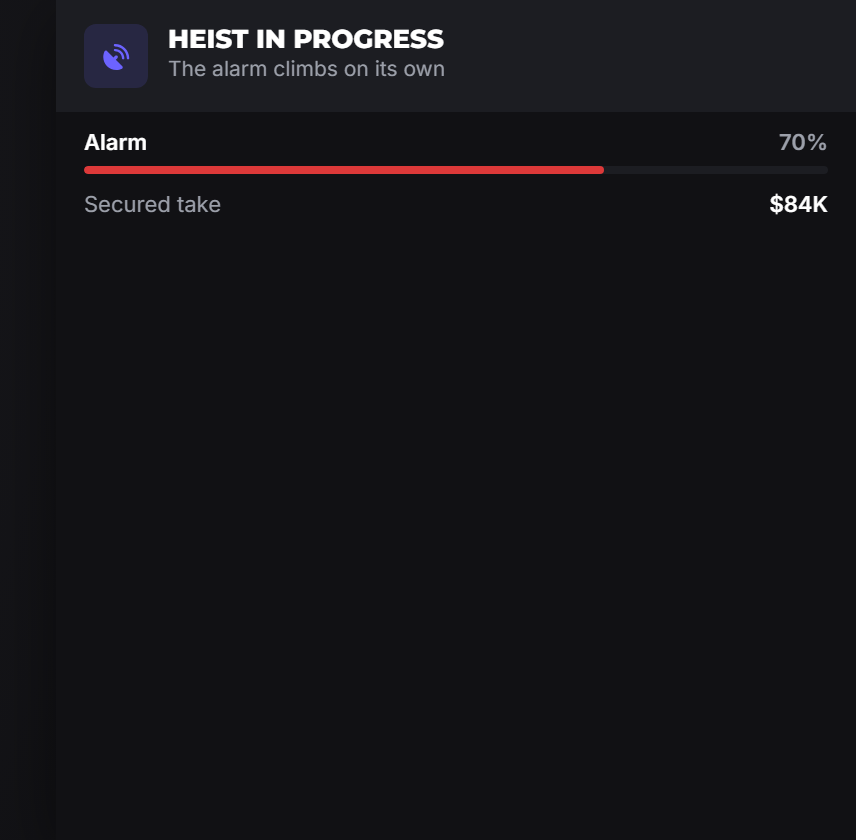
CreateThread(function()
    exports.of_ui:drawer({
        title = 'Heist in progress',
        subtitle = 'The alarm climbs on its own',
        icon = 'satellite-dish',
        focus = false,
        rows = {
            { type = 'progress', id = 'alarm', label = 'Alarm', value = '0%', progress = 0,
              colorScheme = '#dd3939' },
            { type = 'keyvalue', id = 'loot', items = { { label = 'Secured take', value = '$0' } } },
        },
    })

    for i = 1, 10 do
        Wait(600)
        exports.of_ui:updateDrawer({
            rows = {
                alarm = { progress = i * 10, value = (i * 10) .. '%' },
                loot  = { items = { { label = 'Secured take', value = '$' .. (i * 12) .. 'K' } } },
            },
        })
    end

    exports.of_ui:closeDrawer()
end)
warning
Use display rows only in a passive panel. There is no footer to submit with and no focus to type with, so editable fields have no way to be answered, and nothing on screen can close the panel. closeDrawer() is the only way out, so make sure your script always reaches it.
Buttons and actions
A buttons row gives the panel actions that do not close it. Each click calls onAction with that button's id:
exports.of_ui:drawer({
    title = 'Sultan RS',
    confirm = false,
    onAction = function(id)
        if id == 'gps' then
            SetNewWaypoint(...)
        elseif id == 'call' then
            TriggerServerEvent('shop:call')
        end
    end,
    rows = {
        { type = 'buttons', items = {
            { id = 'gps',  label = 'Mark on GPS', icon = 'location-dot' },
            { id = 'call', label = 'Call the shop', icon = 'phone', colorScheme = '#61fd59' },
        } },
    },
})
Pair onAction with updateDrawer to react in the panel itself:
onAction = function(id)
    if id == 'refresh' then
        exports.of_ui:updateDrawer({ rows = { status = { value = 'Updated', progress = 100 } } })
    end
end,
onAction runs in its own thread, so a slow handler never stalls the UI. Errors inside it are caught and printed rather than breaking the panel.
Notes
- One blocking drawer at a time. A second
drawercall while one is open returnsnilinstead of queuing. Passive panels are replaced by the nextdrawercall. onActionstays in Lua. Functions cannot cross into the UI, which is why buttons report byid.- Long panels scroll. The header and footer stay put.