
UI Library
List menu
A keyboard-driven menu pinned to a screen corner. The player moves with the arrow keys, side-scrolls values, ticks checkboxes and confirms, without ever needing the mouse.
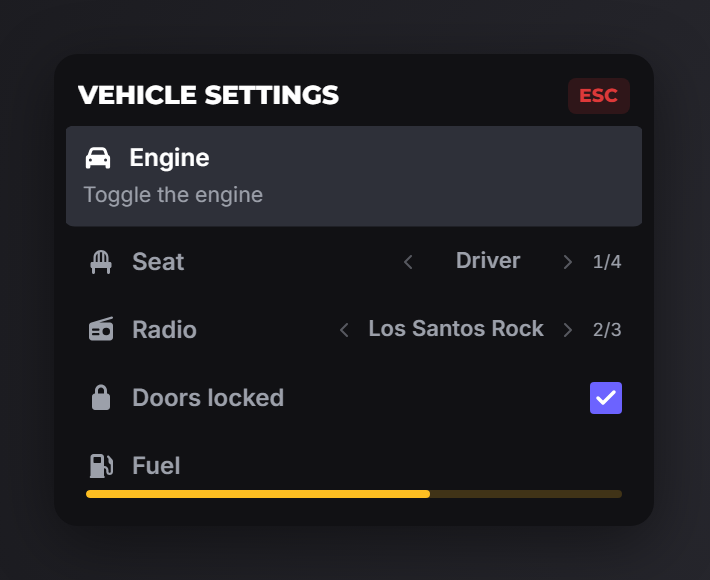
registerListMenu
exports.of_ui:registerListMenu(data, cb)| Field | Type | Description |
|---|---|---|
id | string | Unique id. Required. |
title | string | Header text. Required. |
options | table[] | The rows. Required. |
position | string? | top-left, top-right, bottom-left, bottom-right. |
disableInput | boolean? | Default true: firing, melee and the weapon wheel stay suppressed while the menu is open. false leaves every control alone. |
hardBlock | boolean? | true takes game input away entirely: the player stands still until the menu closes. |
canClose | boolean? | false removes ESC / Backspace. |
onSelected | function? | (selected, scrollIndex?, args?): fires as the highlight moves. |
onSideScroll | function? | (selected, scrollIndex, args?): fires when a value row is scrolled. |
onCheck | function? | (selected, checked, args?): fires when a checkbox is toggled. |
onClose | function? | (keyPressed?): 'Escape' or 'Backspace'. |
cb is the confirm handler: (selected, scrollIndex?, args?).
Every index handed to these callbacks is 1-based, matching the order you declared the options.
showListMenu
exports.of_ui:showListMenu(id, startIndex)| Argument | Type | Description |
|---|---|---|
id | string | A registered menu. |
startIndex | number? | 1-based row to start on. Defaults to the first. |
hideListMenu
exports.of_ui:hideListMenu(onExit)Closes the menu. Pass true to also fire its onClose.
setListMenuOptions
exports.of_ui:setListMenuOptions(id, options, index)Replaces one option when index is given, or all of them when it is not. If that menu is currently open it refreshes in place, so you can rebuild rows while the player is looking at them.
getOpenListMenu
local id = exports.of_ui:getOpenListMenu()Returns the id of the open menu, or nil.
Options
| Field | Type | Description |
|---|---|---|
label | string | Row label. |
description | string? | Muted second line. |
icon | string? | Icon on the left. |
iconColor | string? | Hex colour for the icon. |
progress | number? | 0–100 bar under the label. |
colorScheme | string? | Accent for the progress bar. |
values | table? | Makes the row side-scrollable. Entries are strings or { label, description? }. |
defaultIndex | number? | 1-based starting position of a values row. |
checked | boolean? | Makes the row a checkbox with this initial state. |
args | table? | Passed to the callbacks. Never sent to the UI. |
close | boolean? | false keeps the menu open after confirming this row. |
Example
exports.of_ui:registerListMenu({
    id = 'vehicle_settings',
    title = 'Vehicle settings',
    options = {
        { label = 'Engine', icon = 'car', description = 'Toggle the engine', close = false },
        { label = 'Seat', icon = 'chair', values = {
            'Driver', 'Passenger',
            { label = 'Rear left', description = 'Behind the driver' },
            'Rear right',
        } },
        { label = 'Radio', icon = 'radio', defaultIndex = 2, values = {
            'Off', 'Los Santos Rock', 'Non-Stop-Pop',
        } },
        { label = 'Doors locked', icon = 'lock', checked = true },
        { label = 'Fuel', icon = 'gas-pump', progress = 64, colorScheme = '#fdbe22' },
    },
    onSideScroll = function(selected, scrollIndex)
        if selected == 3 then TriggerEvent('radio:setStation', scrollIndex) end
    end,
    onCheck = function(selected, checked)
        if selected == 4 then TriggerEvent('vehicle:setLocked', checked) end
    end,
}, function(selected, scrollIndex)
    print(('confirmed row %d (value %s)'):format(selected, tostring(scrollIndex)))
end)

exports.of_ui:showListMenu('vehicle_settings')
Notes
- Checkbox state is remembered. Toggling a checkbox updates the registry, so reopening the menu shows the state the player left it in.
close = falsekeeps the menu open after confirming: for rows the player toggles repeatedly.- The player can keep moving while the menu is open. Its keys (arrows, Enter, Backspace, ESC) are read on the Lua side and forwarded to the UI, so navigating the menu never costs the player their controls.
disableInput(defaulttrue) still suppresses firing, melee and the weapon wheel;hardBlock = trueis the opt-in for a menu that should freeze the player outright.