
Objectives
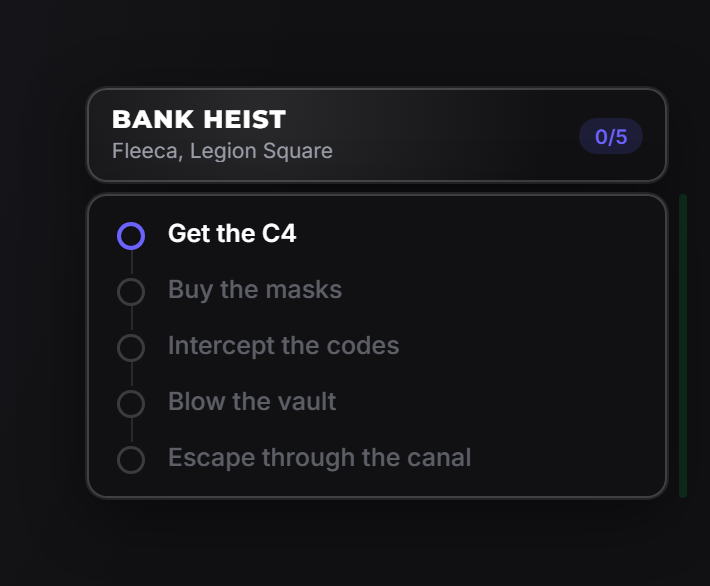
A mission timeline pinned to the screen edge. Completed steps are ticked and green, the current one is highlighted, later ones stay muted. Pure HUD. It never takes focus and never blocks.
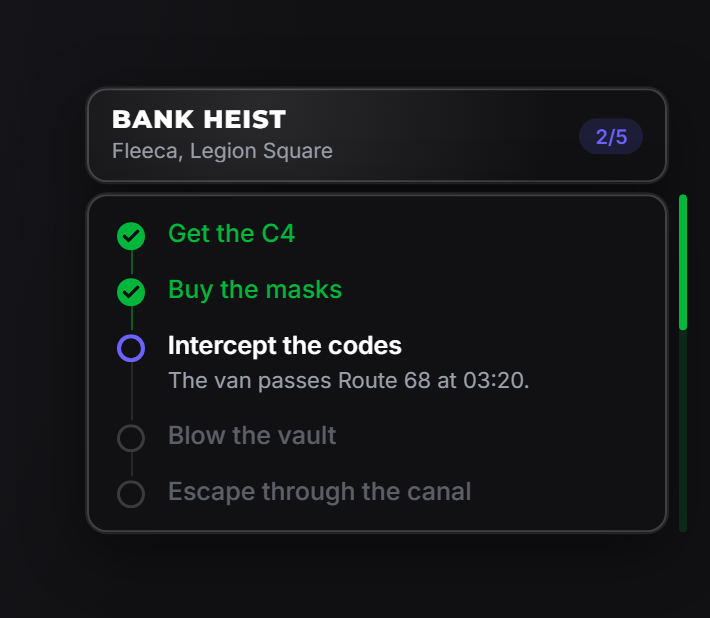
One pointer drives every state: everything before it is done, the step at it is active, everything after is pending. Advancing a mission is moving the pointer: there is no per-step state to keep in sync.
showObjectives
exports.of_ui:showObjectives(data)| Field | Type | Description |
|---|---|---|
steps | table[] | The steps. Required, and must not be empty. A bare string becomes a step with that label. |
title | string? | Header title. |
subtitle | string? | Muted line under the title. description is accepted as an alias. |
icon | string|table? | Header icon. |
current | number|string? | Starting step: a step id or a 1-based index. Defaults to the first. |
position | string? | left-center, right-center, top-left, top-right. Theme decides when omitted. |
Steps
| Field | Type | Description |
|---|---|---|
label | string | What the player has to do. |
id | string? | Handle for setObjective. The 1-based index works too. |
description | string? | Extra line, shown only while that step is active. |
exports.of_ui:showObjectives({
    title = 'Bank heist',
    subtitle = 'Fleeca, Legion Square',
    steps = {
        { id = 'c4',     label = 'Get the C4' },
        { id = 'masks',  label = 'Buy the masks' },
        { id = 'codes',  label = 'Intercept the codes',
          description = 'The van passes Route 68 at 03:20.' },
        { id = 'vault',  label = 'Blow the vault' },
        { id = 'escape', label = 'Escape through the canal' },
    },
})
Shorthand when steps need nothing but a label:
exports.of_ui:showObjectives({
    title = 'Bank heist',
    steps = { 'Get the C4', 'Buy the masks', 'Blow the vault', 'Escape' },
})
advanceObjective
local allDone = exports.of_ui:advanceObjective()Marks the current step done and activates the next one. Returns true once the pointer has moved past the last step, which is how you detect the mission finishing:
if exports.of_ui:advanceObjective() then
    exports.of_ui:notify({ type = 'success', title = 'Heist complete' })
    Wait(2000)
    exports.of_ui:hideObjectives()
end
setObjective
exports.of_ui:setObjective(ref)Jumps the pointer to a step, by id or 1-based index. Everything before it becomes done. Use it when the mission is not strictly linear: a skipped step, a branch, a restored save.
exports.of_ui:setObjective('vault')  -- by id
exports.of_ui:setObjective(4)        -- by index
completeObjectives
exports.of_ui:completeObjectives()Marks everything done at once. The badge turns green.
hideObjectives
exports.of_ui:hideObjectives()Removes the panel.
objectivesState
local open, current = exports.of_ui:objectivesState()Whether a set is showing, and which 1-based step is active. current equals #steps + 1 when everything is done.
Example
CreateThread(function()
    exports.of_ui:showObjectives({
        title = 'Bank heist',
        subtitle = 'Fleeca, Legion Square',
        steps = {
            { id = 'c4',     label = 'Get the C4' },
            { id = 'vault',  label = 'Blow the vault' },
            { id = 'escape', label = 'Escape through the canal' },
        },
    })
end)

RegisterNetEvent('heist:c4Acquired', function()
    exports.of_ui:advanceObjective()
end)

AddEventHandler('onResourceStop', function(resource)
    if resource == GetCurrentResourceName() then exports.of_ui:hideObjectives() end
end)
Notes
- Nothing blocks. Every export returns immediately and the player keeps playing.
- Only the active step shows its description: done is past, pending would spoil what is coming.
- Always hide it on resource stop, or the panel outlives the mission.
- For phases inside a panel rather than on the HUD, use the
timelinerow in a drawer.